
Free Photoshop layer style to get this sweet Twitter button
Ever since the official Twitter application for Mac came out I've been drooling over the lovely blue "Tweet" button. So I thought about producing a layer style in Photoshop to replicate the effect.
Below you can see original "Tweet" button and the preview of the downloadable file at the top of the post, on both a light and dark background. It looks pretty sweet on a light background as well!
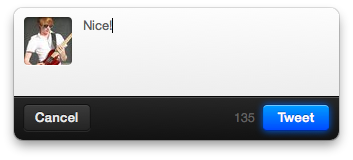
You can download and start applying the blue glow to any of your favourite button shapes! Simply right click on the button layer, copy the layer style and paste it onto another layer with a nice looking button shape on.
If you found this useful, please give it a mention!
14 comments
Yuhn M wrote on
Thereś seem to be a problem with the download link you provided…
Benjamin Reid wrote on
Apologies for that, it should be working now!
layer style wrote on
A person essentially help to make significantly posts I’d state. That is the first time I frequented your web page and so far? I surprised with the research you made to make this particular submit extraordinary. Wonderful job!
Pridit wrote on
Was that english?
Pingback: Core Crack.Net - Your Local Warez.
Make money on twitter | Tweeternaire wrote on
I heard that it is very difficult to earn money on twitter. How are many people making so much money on Twitter? I want to know how people are using Twitter to become rich. I am totally confused.
Are there any books or like which can teach how exactly to use twitter to earn much money? Please tell me what are the ways in detail, I am willing to pay if I find useful information on how to monetize on twitter.
Thanks.
Pingback: tweet adder crack
ITIL certification path wrote on
Hello, Neat post. There’s an issue with your website in internet explorer, might check this? IE still is the market chief and a huge component of other people will miss your fantastic writing due to this problem.
Pingback: cracked seo tools
volkswagen logo wrote on
Your idea is so good and this layer style is really helpful to create the Twitter button.Here you can also find logo designs just visit my website and download all type of logos.
Pingback: Cracked extabit download
here wrote on
I’m really enjoying the design and layout of your blog. It’s a very easy on the eyes which makes it much more enjoyable for
me to come here and visit more often. Did you hire out a designer to create your theme?
Exceptional work!
Alicia wrote on
Very pretty!
Eric wrote on
Love this, thanks.
Is it just my eyes or does the Inner glow no add anything?