
Your website’s got a favicon right? But does it have an iPhone app icon?
Everyone knows (or should know) what a favicon is, you've probably got one on your website and if you haven't, you should. They're great for finding a particular site amongst a long list of bookmarks and I for one have a lot of bookmarks.
Recently though you've been able to add websites to your iPhone/iPod Touch's home screen by hitting the '+' while in Safari, then pressing 'Add to home screen'. This then adds an icon to your long list of app's but just performs as a shortcut to the desired website.
First you need your icon, design it to 58 by 58 pixels and then save it as PNG. Remember, you don't need any of the fancy rounded corners or glow effect on your icon, the iPhone/iPod Touch will handle that for you.

Now for the code, add this into the <head> of your site and give it a whirl.
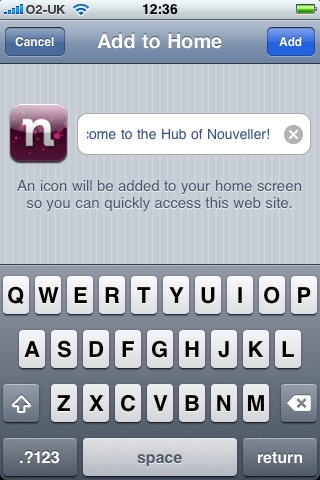
Here's what my site looks like when you try to add it to your home screen.
12 comments
Josh wrote on
Was wondering how to that the other day – thanks!
Callum Chapman wrote on
Excellent little tip – I’ll do this when my new theme is up and running!
twe4ked wrote on
Nice, thanks mate
g-han wrote on
Thanks for this, I’ve got my own icon now!!!Love it!
The Inside Design wrote on
Great tip, works perfectly. Thanks!
Michel Durrett wrote on
I’ve by no means been an Apple fan but I have to confess that the iphone is quite good! I would wish to know if this subject about the iphone four is necessary or not. I would like to buy the new one and I was wondering if the calls really drop more or not. Sorry if it’s a bit off matter
  Thanks
としあき wrote on
ありがとう。
Anita wrote on
Vraiment très enrichissant, votre article est de très bonne qualité.Aussi, j’ai partagé votre site dans mes réseaux sociaux !
men underwear wrote on
hi!,I like your writing so much! share we keep up a correspondence more approximately your article on AOL? I need an expert on this area to solve my problem. Maybe that’s you! Having a look ahead to see you.
Marcellus Diederichs wrote on
I used to be suggested this blog via my cousin. I am no longer sure whether or not this post is written via him as no one else know such certain about my difficulty. You’re incredible! Thanks! Elegant models of London, 22 Greencoat Place, London, SW1P 1DX, 028 9321 0335
Cletus Buglisi wrote on
Style and Sound well it’s not *my* style, but I just googled some similar cases and they’re over $100. So there’s some real incentive to DIY if you like the look.
recuperari creante wrote on
Unquestionably imagine that which you stated. Your favourite justification seemed to be at the net the simplest factor to take into accout of. I say to you, I definitely get irked at the same time as other people think about concerns that they plainly don’t recognise about. You managed to hit the nail upon the top as well as defined out the whole thing without having side effect , people can take a signal. Will likely be again to get more. Thanks